
How to plan an event with an AI that remembers the details
If you have tried to plan an event with AI, in ChatGPT or Claude, you know where it breaks. It drafts the vendor email and writes a run of show in seconds. Then you open a new chat on Tuesday and it has never heard of your event. It is a brilliant temp who leaves every night and takes the notes with them.
So the real record stays where it always was, in your spreadsheet and in your head. That is why your phone goes off on a Saturday. What time does the caterer get here? Which room is the keynote in? Your committee is not being difficult. They ask you because you are the only place the answer lives.
Now think about what a good coordinator's assistant does. They walk the venue with you and they are in the car after the donor lunch. They know what the caterer quoted, why you passed on the other venue, and how many people have actually said yes. Ask them anything, weeks later, and they answer without opening a file.
Orbismo turns the AI you already use into that event planning assistant. You talk to it where you always do, and everything about the event stays in one place it knows. It knows what you tell it, and it never forgets it.
It goes where you go. Tell it something in Claude on Monday, ask about it in ChatGPT from your phone on Thursday, and it is the same assistant with the same answer. When you are ready, your committee can talk to it too.
Here is how that works, step by step. The examples follow one nonprofit gala, an annual black-tie fundraiser run by a literacy council's own staff and a volunteer committee.
Three things to know before you start
Most people who freeze at the empty chat window are worried about doing it wrong, so here are three things to know first.
It keeps the state of things, not the paperwork. Contracts stay in your email and invoices with your accountant. It knows who is booked, what they quoted, what is paid, who is coming, and what happens at 7:15.
Nobody else has to learn anything either. Anyone you bring in talks to it the way you do, in whatever AI they already use. People who only want to look can read the whole thing in Orbismo itself, with nothing to connect.
It will not guess. If you have not decided the meal count, it keeps that as undecided rather than inventing a number you might repeat to a caterer. When something is unclear, it asks, one question at a time.
And you cannot break it. Anything entered wrong is fixed by saying so, including a refund, a cancelled booking, or a guest who said yes and then no. When you reverse something that matters, it notes why, so the trail is there later.
Set it up once
- Create a world at orbismo.com and choose the Event Workspace template.
- Connect the AI you already use. It is a one-time step, and the help site walks through it.
Then talk to your AI the way you always have. What you tell it is kept in Orbismo, where you and anyone you invite can look at it. You never have to type into Orbismo itself.
Your first session: it asks, you answer
You do not need to arrive prepared. An empty world runs a short interview instead of showing you a form, one question at a time.
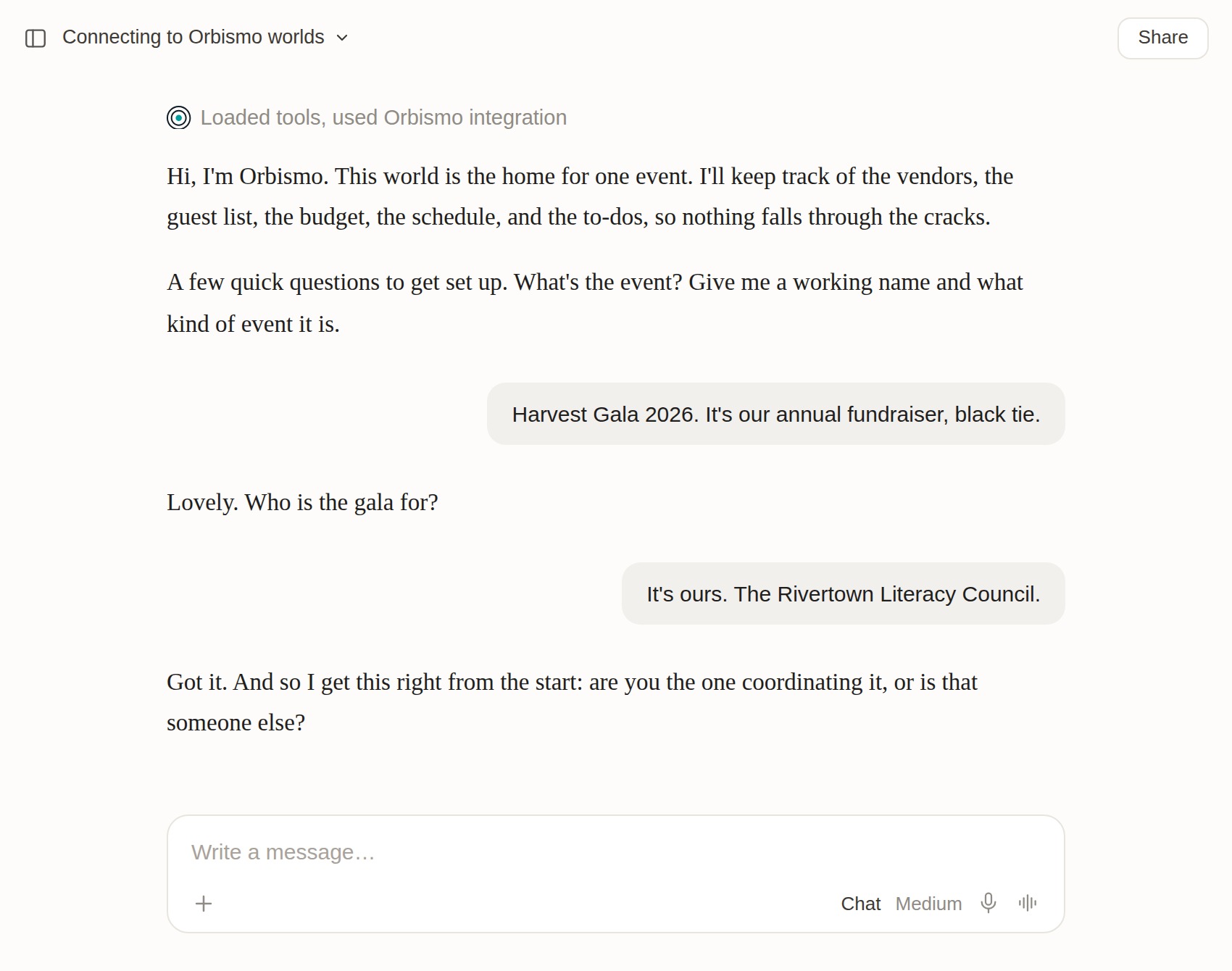 There is no form. It asks, you answer, and it builds as you go.
It asks seven questions, one at a time:
- What the event is, and what kind of event it is.
- Who it is for.
- Whether you are the one coordinating it.
- The date, or a target window.
- The rough headcount.
- Whether there is a venue yet.
- The budget target.
"Not yet" is a complete answer to any of them. Whatever you skip is kept as not known yet, never filled in with a guess.
If you already have notes, paste them in and say "here is what I have so far." If there is a lot in them, it reads back what it is about to save and waits for your go-ahead, so nothing lands wrong. From then on it is part of what the event knows.
Plan an event with AI by just describing things
You describe the event the way you would to an assistant, and it gets kept.
You: Toured The Ironworks yesterday. Capacity 260, indoor, they let you bring your own caterer. Rosa at Copper Spoon is who we have been emailing about food.
That saves two businesses, a venue holding 260 with no in-house catering requirement, yesterday's tour as a dated visit, a person to call at the caterer, and where you stand with each. It may ask one thing back, like how you found them, and then it is done.
Vendors, venues, and quotes
Where you stand with a vendor lives in one place: found them, asked, meeting booked, quote in, shortlisted, booked, deposit paid, paid off, passed. Ask "what is still open?" and you get everyone still in play, grouped by category. Ask "who do I call at Northline?" and you get the right person rather than the switchboard.
Say why you passed on someone. Rule a vendor out and it keeps the reason.
You: Pass on The Belvedere, no loading dock and they wanted 4,000 over.
Four months later somebody asks why not The Belvedere, and the answer is written down instead of reconstructed.
If a booked venue falls through, it marks the date unconfirmed again, flags everything on the schedule that was happening there, reminds you the deposit may be refundable, and retires the to-dos that no longer apply.
Quotes go in as quotes: total, deposit, when the balance is due, what is included and what is not, whether they confirmed your date, and when the quote expires. Then "compare the catering quotes" lays them side by side on price, what is included, and availability.
The guest list and RSVPs
Guests go in the same way, with one detail that earns its keep as soon as more than one person is adding names: it asks whose list each name came off, and keeps that.
The count is never a stored number. Ask "how many are coming?" and it counts the people who said yes, right then. A plus-one becomes a real person once they have a name and joins the count on their own, so when fourteen guests bring someone, the caterer hears 184 and not 170. Ask "meal counts for the caterer?" and it groups every yes by meal choice, with the dietary notes listed separately.
Money has exactly one home
This is the part that fixes the spreadsheet problem: the budget tab that stops agreeing with the vendor tab about a month out.
Every dollar is a budget line. It is not a note on the vendor, not a number in a chat, and not a cell you will remember to update.
Sponsorships are where most spreadsheets quietly go wrong:
You: Halloran and Wells are sponsoring 8,000 toward catering. Copper Spoon quoted 18,400.
That is $18,400 of spend and $10,400 net to the Council. The sponsorship offsets. It does not cancel the catering line and it never adds to what you are spending. If you have ever watched a board member read that budget as $26,400 because the sponsorship went in the wrong column, this is that bug, closed.
It also knows the difference between promised and received. A pledge counts toward your net from the day it is made. When the full amount arrives, the net stays the same and the pledge becomes money in hand.
Then the questions are just questions. "Where are we against budget?" "What is left to pay, and when?" "Who is paying for what?" Totals are worked out from the lines each time, so there is no stale summary row to distrust.
The run of show and what is due
The schedule is built the same way. "Doors open at 6, and Yusuf's keynote is at 8:15 with Marcus introducing him" gives you two timed moments on the schedule, and puts Marcus's name on the second one. Setup and teardown go on the schedule too. Say "read back the run of show" and you get the day in order: time, what happens, who owns it, and where.
Ask what looks off and it looks for four things:
- Two things in the same room at the same time.
- Gaps longer than you would want.
- Moments nobody owns.
- Moments with no location, where one matters.
It raises them as questions, not verdicts.
To-dos are dated by when they are due, so "what is overdue?" is an answer rather than a scan down a list. Hard dates, like the final headcount to the caterer or a balance coming due, are flagged first.
A finished to-do stays as history, and one that no longer applies because you passed on that vendor is retired rather than deleted. In the last few weeks before the event, it offers the rundown before you ask.
Two people, one record
Everything so far, you have done alone. Bring in one more person and none of it changes, except the two things that matter most: you are no longer the only one who can answer a question about this event, and you are no longer the only one who can add to it.
The assistant that works for you now works for Marcus, your executive director, too, from his own AI, on his own days. Either of you can ask it cold, weeks later, in a brand new chat. "Where do things stand?" gets the date, the venue, the attending count, what is booked, and what is due this week.
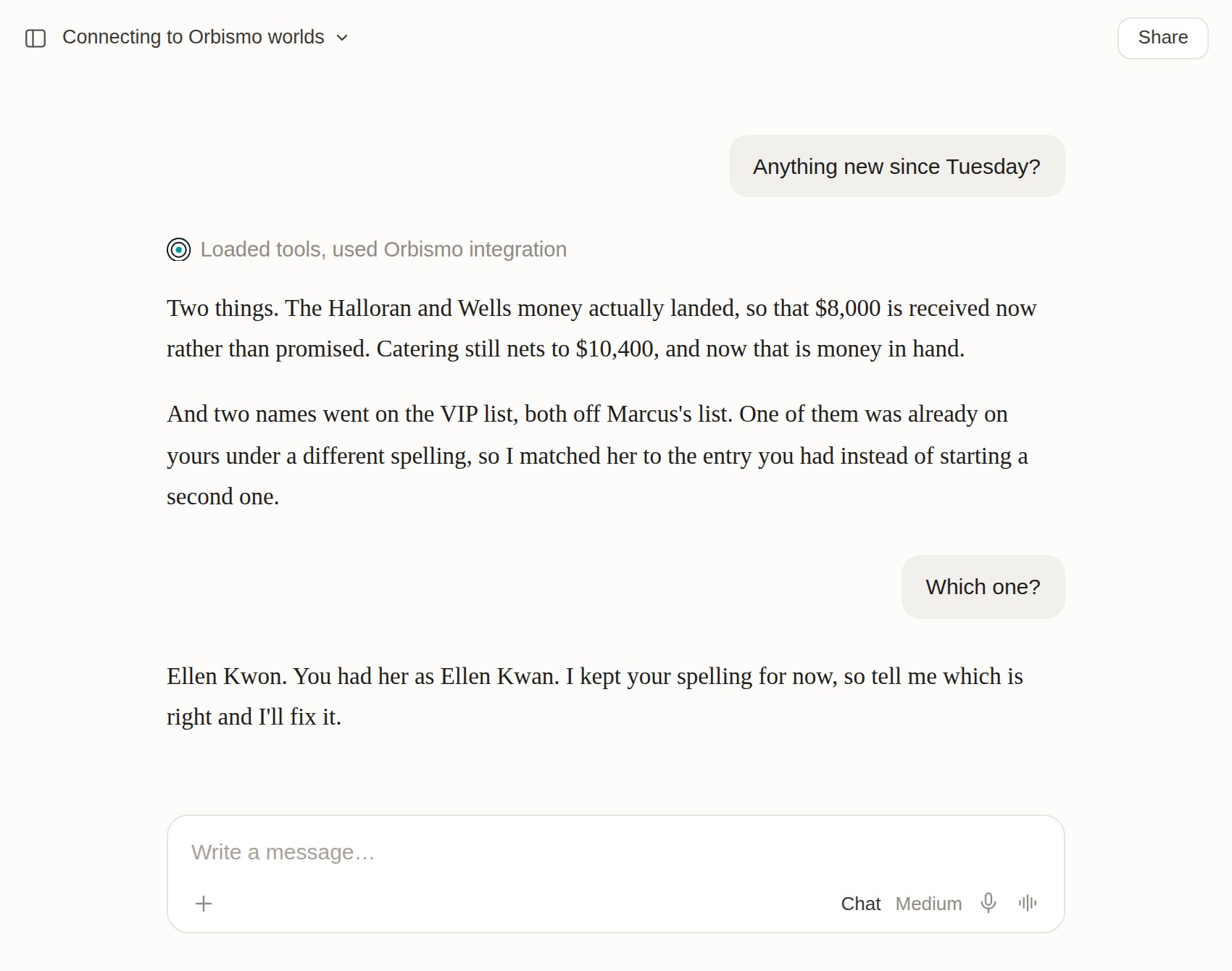 Two people wrote to one record from different chats on different days, and nothing had to be merged.
Marcus talked to his AI in the car after a donor lunch. You asked yours the next morning. Neither of you opened a file, told the other what you had done, or checked whether the other had already put Ellen Kwon on the list.
When Marcus added her, it noticed you already had an Ellen Kwan and asked him whether that was the same person before it saved anything. Then it told you which spelling it kept and asked which one is right.
That is the part a shared spreadsheet cannot do. A shared spreadsheet lets two people type. It does not notice that Ellen Kwan and Ellen Kwon are one person, and it does not keep the sponsorship out of the spend column.
On the day
This is where it pays off. By the week of the event, the answers are all in there:
- Who arrives when, and through which door.
- Which room the keynote is in, and who introduces it.
- How many vegetarian meals.
- Who to call at the AV company.
Invite your volunteers and day-of staff as read-only members. Each of them connects their AI to the world once, the same way you did, and anyone who would rather not can open Orbismo itself and read the same thing.
On the day, each of them asks their own AI instead of asking you.
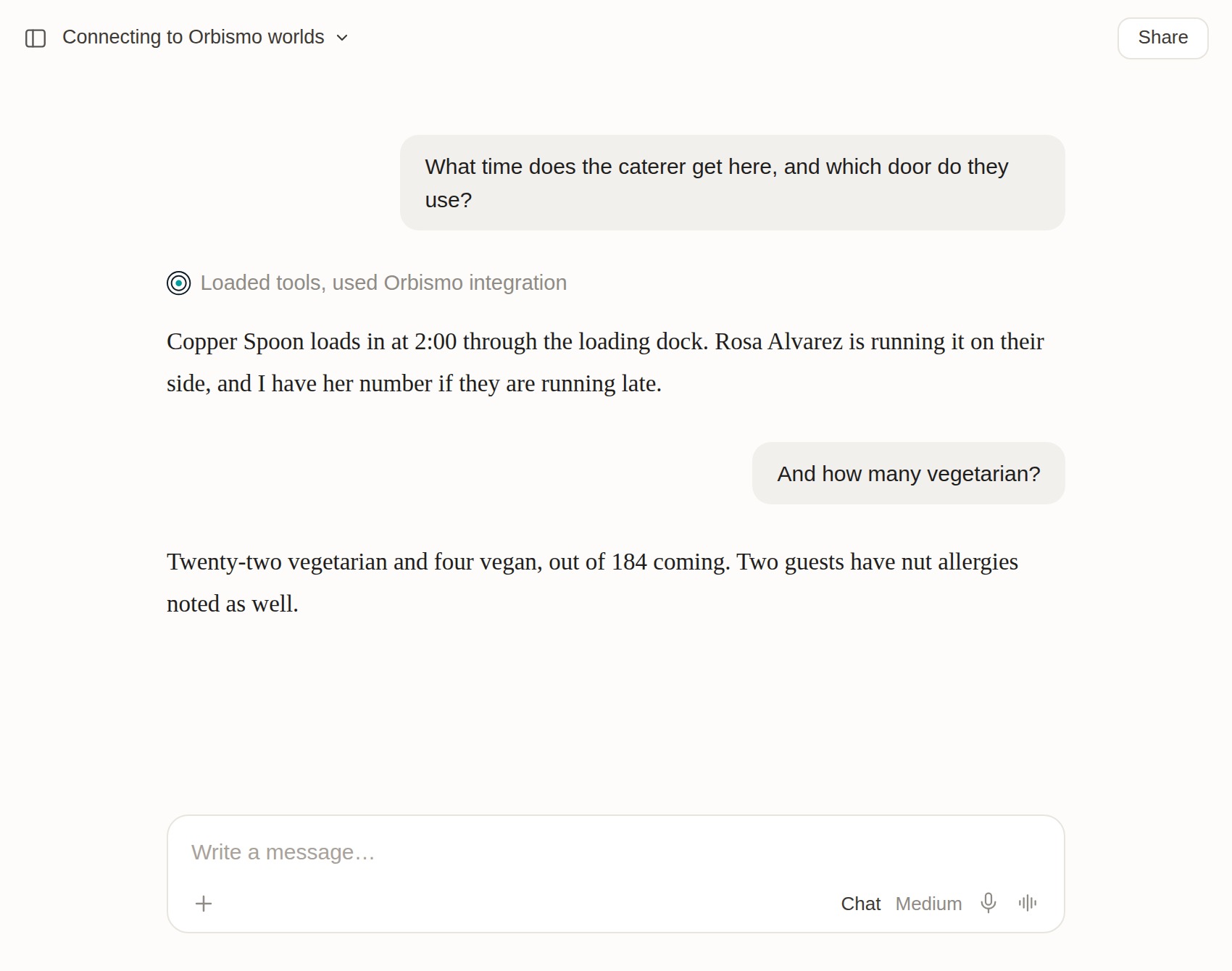 Your phone stayed in your pocket.
Nobody has to find you in the loading dock, and nobody has to read a spreadsheet on a phone screen. Nobody can move the keynote by accident either: if someone with read-only access tries to change something, it says so, kindly, and points them at someone who can.
It answers from what was put in, nothing more, so the schedule check the week before is what makes the day work.
Sharing is the part you pay for. Your first world is free for life and it is yours alone. The moment there are two of you it is a shared world, and it goes up from there to the whole committee and the day-of crew. Some people can write and some can only read, and everyone is looking at the same event. See the plans.
A phrasebook
Nothing here is a command. Most AI event planning guides, and every list of ChatGPT event planning prompts, teach you how to phrase a request. These are ordinary sentences, and you can vary them however you like.
| When you want to… | Say something like… |
|---|---|
| Start an event | "This is the Harvest Gala, an annual fundraiser in November" |
| Hand over what you already have | "Here is what I have so far" (then paste) |
| Add a vendor, and who you deal with there | "___ is our caterer, ___ is who we email" |
| Find the right person at a vendor | "Who do I call at ___?" |
| Save a quote | "___ quoted ___, deposit ___, balance due ___" |
| Compare options | "Compare the catering quotes" |
| Rule a vendor out, with the reason | "Pass on ___, because ___" |
| Add guests and log RSVPs | "Add ___ to the VIP list, plus-one allowed" / "___ is coming, vegetarian" |
| Get meal counts | "Meal counts for the caterer?" |
| Record a sponsorship | "___ are sponsoring ___ toward ___" |
| See who is paying | "Who is paying for what?" |
| Add to the schedule | "Doors open at 6, ___ is running it" |
| Have it check your schedule | "Read back the run of show and tell me what looks off" |
| Add a deadline | "Final headcount is due to the caterer on ___" |
| Update a to-do | "___ is done" / "___ is stuck, because ___" |
| Fix something recorded wrong | "That is wrong, ___ declined" |
| Get re-oriented | "Where do things stand?" / "What is overdue?" |
| Ask a day-of question | "What time does the caterer get here?" / "Which room is the keynote in?" |
| Check the gaps | "What is still open?" / "Who has not responded?" |
Start your own
Pick your next event and say one sentence about it. That is the whole first step.
Your first world is free for life, no credit card required.
New to all this? Start with what a world your AI remembers actually is.
Plan an event with an AI that remembers the details. Create your free world
Questions? We are at orbismo.com/support.